Five platforms for GI groups managing physician credentialing, payer enrollment, and billing across multiple locations.
Quick Summary
Assured is our top pick for growing gastroenterology groups that want credentialing and payer enrollment work handled, not just tracked. Its agents execute applications, submissions, and payer follow-ups while teams handle decisions and exceptions. Assured also supports the tax ID, location, and payer relationships that multi-site GI groups need to manage.
Other options worth considering:
● Incredable: For specialty practices and surgery centers looking for credentialing software with flat-fee pricing.
● Provider Passport: For groups interested in automated payer submissions, follow-ups, and payer-plan research.
● CredentialingSpectrum: For teams that need CAQH integration, form automation, and enrollment tracking.
● CredyApp: For in-house credentialing teams that want better task management and follow-up tracking.
The main differences come down to how much work each platform performs, what still falls to your staff, and how well it handles your group's billing structure.
What a late application costs a GI practice
Medicare generally allows eligible physicians to bill retrospectively for services furnished up to 30 days before their enrollment effective date, provided they meet the applicable requirements.
Consider a gastroenterologist who starts seeing Medicare patients on March 1 but doesn't file an initial enrollment application until May 1. If the application is approved with an effective date of May 1, the physician may bill for eligible services beginning April 1. Services provided in March fall outside that period.
CMS uses these same dates in its enrollment guidance.
That's just Medicare. GI practices also need to manage commercial plans, Medicaid, APPs, and anesthesia providers. Each payer has its own requirements and timelines.
For groups operating endoscopy centers, another distinction applies. Physician professional services, ASC facility services, and anesthesia professional services may be billed separately. Enrollment requirements depend on the entities providing those services.
A completed credentialing file doesn't establish that every required payer enrollment is active. The practice still needs to confirm the provider's participation, billing tax ID, applicable location, and effective date.
The right software can make that work easier. But not every platform handles every part of the process.
What is credentialing and payer enrollment software?
Credentialing and payer enrollment are related, but they're different jobs.
Credentialing verifies a provider's qualifications, including education, training, licenses, board certifications, and professional history. Primary source verification confirms that information with the original issuing organizations. The resulting file supports credentialing committee review.
Payer enrollment establishes a provider's participation with Medicare, Medicaid, and commercial health plans. It can involve individual and group applications, Medicare reassignments, payer contracts, roster submissions, and follow-ups through approval.
Some software primarily stores provider records, fills forms, and tracks deadlines. Other platforms also execute submissions and payer follow-ups.
For gastroenterology groups, the software should account for how physicians, practice locations, billing entities, and payer contracts fit together.
Why does credentialing and payer enrollment software matter for GI practices?
New gastroenterologists may face enrollment restrictions
Some payers and hospitals won't process a new gastroenterologist's specialty enrollment until fellowship training is complete.
Practices can collect documents and prepare applications earlier, but submission timing still depends on the payer's requirements. That needs to be factored into provider start dates.
Tax IDs and practice locations affect reimbursement
GI groups may operate physician practices, endoscopy centers, and anesthesia services under different entities.
An enrollment approved under one tax ID or practice location doesn't automatically establish participation under another. Incorrect provider, tax ID, or location associations can lead to claim denials and additional work for the revenue cycle management team.
Payer follow-ups continue after submission
A complete application can still sit with a payer for weeks. Payer follow-ups may require additional documents, corrections, or status checks.
Delegated credentialing doesn't eliminate these delays. A provider submitted on a roster may still be waiting for the payer to load their information.
Acquisitions create additional enrollment work
When an acquired GI practice joins an existing group, administrators must determine which payer contracts apply, update CAQH information, complete Medicare reassignments when required, and submit additional enrollment requests.
Not every provider needs a new application. The work depends on the existing contracts, entities, and payer requirements.
Revalidations and renewals need ongoing attention
CAQH profiles generally require reattestation every 120 days, or every 180 days for Illinois providers. Health plans following NCQA standards generally recredential providers at least every 36 months. Most Medicare providers revalidate every five years, although CMS can request off-cycle revalidation.
Keeping these requirements current is part of healthcare compliance management, alongside license renewals, DEA registrations, and sanctions monitoring.
5 best credentialing and payer enrollment software platforms for gastroenterology
1. Assured
Best for: Growing gastroenterology groups that want credentialing and payer enrollment work handled, not just tracked.
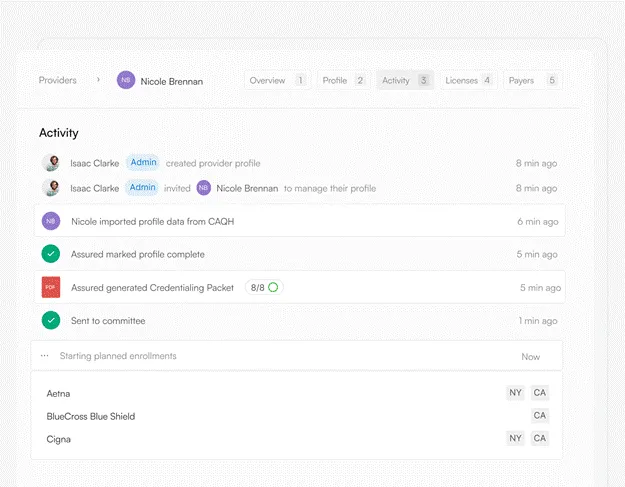
Assured is a provider network management platform used by healthcare organizations, including Allied Digestive Health. Its agents handle provider credentialing, payer enrollment, licensing, roster management, and ongoing monitoring, reducing the administrative work required to get providers credentialed and enrolled.
The difference is how much of the work Assured takes on. Its agents verify credentials, prepare payer-specific applications, navigate supported payer portals, submit applications, and follow up with payers. Teams step in when information is missing or a decision requires their involvement.
For gastroenterology groups, that matters when adding physicians, APPs, and anesthesia providers across multiple practices. Each new provider may require enrollment under different payer contracts, billing tax IDs, and practice locations.
Assured maintains those relationships alongside the provider's information. Agents can prepare applications using the correct entity and location details, with enrollment status, payer identifiers, and effective dates tracked in one place.
The work doesn't stop at submission. Agents continue following up with payers, record responses, and flag outstanding requirements. This gives the enrollment team a clearer view of what's moving, what's stalled, and what needs attention.
Assured also supports delegated credentialing and payer roster workflows, helping groups manage provider additions, demographic changes, location updates, and terminations.
As an NCQA-certified CVO, Assured delivers committee-ready credentialing files within 48 hours, submits enrollment applications within 72 hours of receiving complete provider information, and achieves a first-pass payer approval rate of about 95%. Actual approval timelines depend on the payer.
Key features
● Agent-executed payer enrollment: Prepare and submit payer-specific applications through supported workflows, with ongoing payer follow-ups.
● 48-hour credentialing files: Complete primary source verification across more than 2,000 sources and prepare committee-ready files.
● Multi-entity enrollment management: Track provider enrollments by payer, tax ID, practice location, and line of business.
● CAQH integration: Import provider data, identify missing information, and support profile updates.
● Delegated credentialing and rosters: Maintain verification records and prepare payer-specific roster updates.
● Licensing and monitoring: Manage licensing workflows and track expirations, sanctions, and exclusions.
● Closed-panel detection: Identify payer restrictions before unnecessary applications are submitted.
Pricing
Assured provides custom quotes based on provider volume, enrollment requirements, and the workflows being managed.
Pros
● Agents execute credentialing and payer enrollment work instead of only organizing tasks.
● Supports enrollment operations across multiple practices, tax entities, and payer networks.
● Credentialing, enrollment, licensing, and monitoring use connected provider information.
Cons
● No published pricing, so practices need a quote to compare costs.
● Some payer requirements and exceptions still require human involvement.
● Smaller practices with limited enrollment volume may not need the full platform.
2. Incredable
Best for: Specialty practices and surgery centers looking for credentialing software with flat-fee pricing.
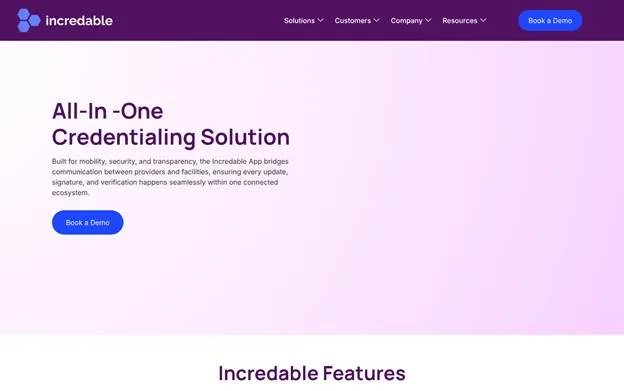
Incredable, from Intiva Health, combines provider credentialing, enrollment management, document storage, and expiration tracking.
The platform supports facility profiles and provider assignments, making it relevant for GI groups managing physician records alongside endoscopy center information.
Its pricing structure is a key selling point. Incredable offers flat-fee plans with unlimited provider profiles rather than charging separately for each provider.
ReadyForms helps teams complete enrollment documents using stored provider information. The platform also offers customizable workflows, primary source verification, electronic signatures, and enrollment tracking.
Key features
● Primary source verification: Verify provider qualifications, licenses, and certifications.
● ReadyForms: Populate credentialing and payer enrollment documents using stored provider information.
● Facility management: Maintain facility profiles, provider assignments, and related documents.
● Custom workflows: Configure credentialing, enrollment, and renewal processes.
● Expiration monitoring: Track licenses, certifications, and documents approaching expiration.
● Enrollment management: Organize payer applications and monitor progress.
Pricing
Incredable offers Classic, Payer, Advanced, and Enterprise plans. Pricing is quoted after a demo, with flat-fee plans and unlimited provider profiles.
Pros
● Unlimited provider profiles make costs easier to forecast as a group grows.
● Facility and provider records can be maintained together.
● Configurable workflows and document management.
Cons
● Exact pricing isn't published.
● Buyers need to confirm which features are included in each plan.
● Practices should verify how payer submissions and post-submission follow-ups work for their specific payers.
3. Provider Passport
Best for: GI groups interested in automated payer enrollment and payer-plan research.
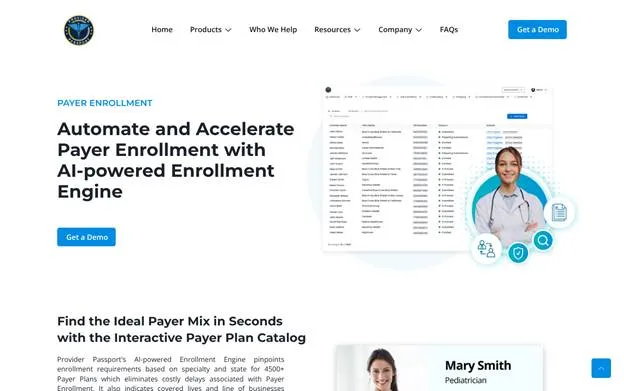
Provider Passport combines credentialing, privileging, payer enrollment, and provider data management.
Its payer-plan catalog is a useful feature for groups entering new markets. Provider Passport says it covers more than 4,500 payer plans, with enrollment requirements by specialty and state, covered lives, and lines of business.
That information can help administrators research payer participation requirements before starting applications.
Provider Passport also offers automated submissions and payer follow-ups. Its enrollment engine sends follow-ups every 15 days, monitors application status, and supports payer communication.
Key features
● Primary source verification: Automated checks across more than 450 primary sources.
● Payer-plan catalog: Research enrollment requirements, covered lives, and lines of business.
● Automated enrollment: Prepare and submit payer applications.
● Scheduled follow-ups: Automated payer follow-ups every 15 days.
● Virtual credentialing boards: Manage credentialing committee reviews and approvals.
● Expiration monitoring: Track provider documents and renewal requirements.
Pricing
Provider Passport doesn't publish standard pricing. Practices need to request a quote.
Pros
● Payer-plan research supports groups evaluating new markets.
● Automated submissions and follow-ups reduce routine enrollment work.
● Credentialing, privileging, and payer enrollment are available together.
Cons
● No published pricing.
● GI groups should confirm support for their specific Medicare reassignment and facility-related workflows.
● Organizations moving from an existing credentialing system need to assess data migration and integration requirements.
4. CredentialingSpectrum
Best for: GI groups that want CAQH-driven credentialing, form automation, and enrollment tracking.
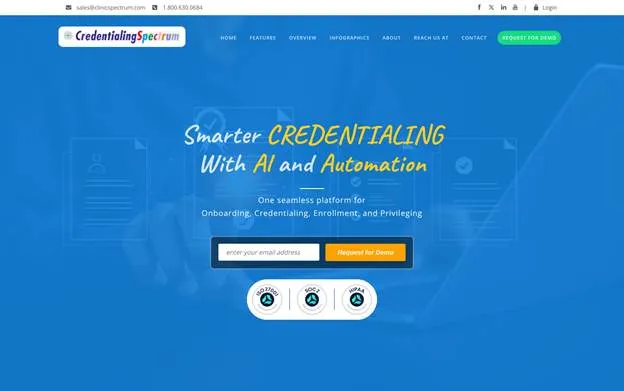
CredentialingSpectrum, from Clinicspectrum, brings provider onboarding, credentialing, payer enrollment, and privileging into one platform.
It integrates with CAQH and supports payer web forms, PDFs, and Excel rosters. It maps provider information into these formats rather than requiring separate entry for every application.
The platform also provides enrollment tracking, turnaround-time monitoring, project management, and AI-assisted workflow tools.
For GI groups that handle different payer forms and roster requirements across states, these capabilities reduce repetitive data entry and improve visibility into outstanding applications.
Key features
● CAQH integration: Import provider information and support profile maintenance.
● Primary source verification: Check NPDB, FSMB, ABMS, Nursys, and other verification sources.
● Payer form automation: Populate web forms, PDFs, and Excel roster templates.
● Enrollment tracking: Monitor application status, payer participation, and processing times.
● Privileging workflows: Manage requests, committee review, and approvals.
● Compliance monitoring: Track expiring credentials and relevant exclusion lists.
Pricing
CredentialingSpectrum doesn't publish standard pricing. Quotes are available on request.
Pros
● CAQH integration reduces repeated provider data entry.
● Supports multiple payer enrollment formats, including rosters.
● Credentialing, enrollment, and privileging workflows are available together.
Cons
● No published pricing.
● Teams should confirm how much payer communication and follow-up the platform performs automatically.
● Payer templates, workflows, and reports may require configuration.
5. CredyApp
Best for: In-house credentialing teams that need task management and payer follow-up tracking.
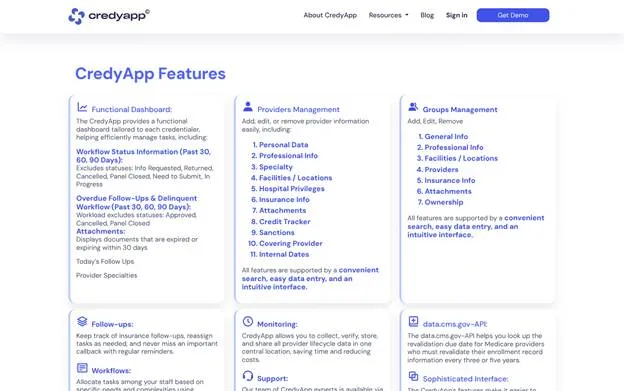
CredyApp focuses on organizing credentialing and enrollment work for internal teams.
It brings together provider records, group information, insurance participation, document management, expiration tracking, and follow-up reminders.
One useful feature is insurance follow-up tracking. Administrators can record payer conversations, set callback dates, and monitor outstanding applications without maintaining separate reminder spreadsheets.
For GI practices with an established credentialing team, CredyApp offers a way to manage existing processes in one system.
Key features
● Provider and group management: Store provider details, group information, documents, and locations.
● Workflow dashboard: Track enrollment work, overdue tasks, and outstanding requirements.
● Insurance follow-up tracking: Record payer contacts and set follow-up reminders.
● Expiration alerts: Monitor expiring documents and credentials.
● Client portal: Give providers access to records and credentialing status.
● Task assignment: Assign credentialing work and monitor progress.
Pricing
CredyApp offers a 30-day free trial. Pricing is provided after requesting a demo.
Pros
● Free trial allows teams to evaluate the platform before purchasing.
● Follow-up reminders help staff stay on top of payer applications.
● Useful for organizations that prefer to manage credentialing internally.
Cons
● Its public materials focus more on managing workflows than on autonomous payer portal submissions.
● Internal teams remain responsible for much of the enrollment work.
● Multi-entity groups should evaluate reporting against their specific tax ID and location requirements.
What should a GI practice compare before choosing software?
Feature lists don't always show how much work a platform actually removes from the credentialing team.
Four questions are particularly useful when comparing vendors.
1. Can it handle the group's billing structure?
Check whether providers can be associated with the correct tax IDs, payer contracts, and practice locations.
For groups operating endoscopy centers, confirm how the platform distinguishes physician enrollment from facility information and privileging requirements.
2. Who submits applications and follows up with payers?
Generating a PDF isn't the same as submitting an application. And submitting an application isn't the same as getting it approved.
Ask the vendor to demonstrate the entire process, including portal submissions, payer responses, corrections, and follow-ups.
3. Can the team confirm when an enrollment is effective?
A submitted application doesn't establish in-network participation.
The system should show approval status, effective dates, payer identifiers, and the applicable billing entity and location. Those details also need to reach the people managing claims, whether that's an internal revenue cycle team or an outside medical billing company.
4. How does it handle roster updates and provider changes?
Delegated groups may need to send separate rosters by payer, state, or contract.
Those updates can include new providers, terminations, demographic changes, and recredentialing. The process should also track payer responses rather than assuming a submitted roster has been processed.
It's worth separating credentialing and enrollment software from endoscopy software, which supports clinical documentation and procedure management. Both matter to a GI practice, but they solve different problems.
Getting your next GI hire billing sooner
For a small practice enrolling a physician occasionally, a credentialing tracker may be enough.
For a growing GI group, the workload is different. New physicians need payer enrollments, acquired practices bring additional applications and reassignments, and administrators must keep provider information accurate across tax IDs and locations. Someone still needs to follow up with payers and confirm approvals.
Assured is worth considering for organizations that want those workflows executed rather than simply tracked. Its agents handle credentialing and payer enrollment, while teams keep control of decisions and exceptions.
Before choosing any platform, ask for a demonstration using your actual payer mix, billing entities, and practice locations. That will tell you more than a generic feature list.
Frequently Asked Questions
How much does credentialing software cost?
Credentialing software may be priced per provider, per user, per application, or through a flat subscription. The five platforms reviewed here generally require a quote for their full pricing, although CredyApp offers a free trial. Ask whether application submissions, payer follow-ups, delegated rosters, and ongoing monitoring are included or charged separately.
How often does a provider need to be credentialed?
Health plans following NCQA standards generally recredential providers at least every 36 months. Most Medicare providers revalidate every five years, although CMS may require off-cycle revalidation. CAQH generally requires reattestation every 120 days, or every 180 days for Illinois providers.
Does a gastroenterologist need separate credentialing for an endoscopy center?
A physician may need separate facility privileges to perform procedures at an endoscopy center. That differs from the center's facility enrollment and the physician's payer enrollment for professional services. The requirements depend on the facility, payer, and billing arrangement.
What software does a credentialing specialist use?
Credentialing specialists commonly use CAQH for provider profiles, PECOS for Medicare enrollment, NPPES for NPI information, primary source verification tools, and payer-specific portals. Credentialing software can bring those records and workflows together. Depending on the platform, it may also automate verification, application submissions, payer follow-ups, roster updates, and monitoring.

Reviewed by