In modern clinical practices, delayed patient documentation remains a top operational bottleneck. Whether a telehealth physician needs a signed consent form, an urgent lab result, or prior authorization paperwork before prescribing treatment, relying on physical drop-offs or legacy hardware frequently stalls care delivery. While clinics have rapidly updated their internal infrastructure, non-tech-savvy patients often struggle to send secure documents from home without specialized equipment.
By establishing clear, streamlined remote intake workflows, clinical staff can bridge this digital divide—ensuring rapid record transmission without compromising patient privacy or delaying time-critical clinical care.
The Remote Intake Bottleneck in Telehealth
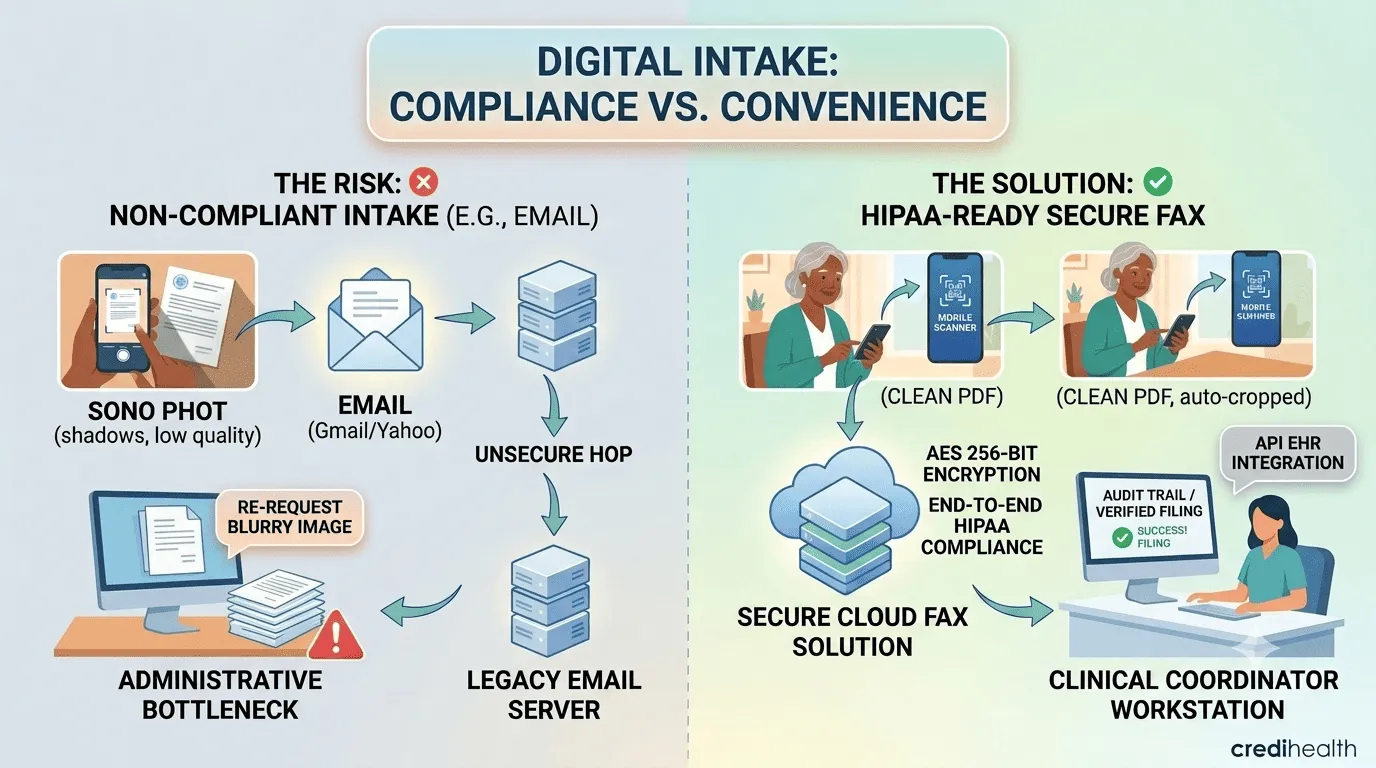
When patients encounter friction sharing paperwork remotely, appointment cancellations, diagnostic delays, and administrative follow-up calls surge. Many households no longer own desktop scanners, multifunction printers, or traditional landline fax machines. When instructed to "send over a document," patients frequently resort to low-quality smartphone photos emailed over unencrypted channels.
This informal approach introduces two major administrative and clinical risks:
-
Unreadable Submissions: Shadowy, skewed, or low-resolution smartphone images of diagnostic reports or insurance cards frequently fail intake quality standards, forcing staff to re-request documents manually.
-
Compliance Vulnerabilities: Transmitting Protected Health Information (PHI) over standard, non-encrypted email exposes clinical practices to regulatory audits and security compliance breaches.
Understanding the importance of electronic health records means recognizing that patient data must remain legible, structured, and securely transmitted from the very first point of contact.
Step-by-Step Remote Submission Protocol for Clinical Staff
To eliminate technical friction for elderly or non-tech-savvy patients, medical coordinators should provide a standardized, 3-step remote intake guide during appointment scheduling.
1. Standardize Mobile Document Capture
Instruct patients to capture documents using native mobile scanning features—such as Apple Notes on iOS or Google Drive on Android—rather than taking standard camera photos. Native document scanners automatically detect document borders, remove shadows, flatten perspective distortion, and compile multi-page files into clean PDF documents that meet clinical storage standards.
2. Offer Accessible, No-Install Transmission Channels
Patients rarely want to create complex software accounts or pay subscription fees simply to transmit a single urgent form. Directing patients toward browser-accessible tools like Fax.xyz for sending free online fax allows them to send single-page records, diagnostic sheets, or signed consent forms straight from a smartphone or desktop without downloading third-party applications.
3. Verify Document Completeness Prior to Consultation
Telehealth coordinators should perform a quick administrative verification as soon as documents arrive in the intake queue:
-
Verify full page visibility and legibility of critical numerical data (e.g., lab ranges, dosage values).
-
Confirm required patient signatures, dates, and consent checkmarks are complete.
-
Route the validated file directly into the patient's active Electronic Health Record (EHR) chart prior to the doctor entering the virtual room.
Maintaining Privacy and Security Across Remote Intake
While convenience drives patient compliance, strict privacy regulations govern clinical operations. Healthcare organizations must ensure that any incoming digital transmission protocol adheres to stringent security protocols.
Integrating modern digital tools for transforming remote patient care enables practices to maintain seamless communication without compromising patient confidentiality. When evaluating remote document ingestion platforms, medical practices must implement end-to-end encrypted pathways.
Deploying dedicated enterprise platforms like iFax for healthcare fax solutions ensures that incoming patient submissions land directly into a secure, HIPAA-compliant digital dashboard. Cloud-based tools safeguard Protected Health Information (PHI) through end-to-end AES 256-bit encryption both in transit and at rest, providing administrative teams with an automated audit trail for every incoming document.
Actionable Checklist for Practice Managers
Operationalizing remote document collection requires clear guidelines across your administrative team. Use this implementation checklist to upgrade your practice's intake workflow:
-
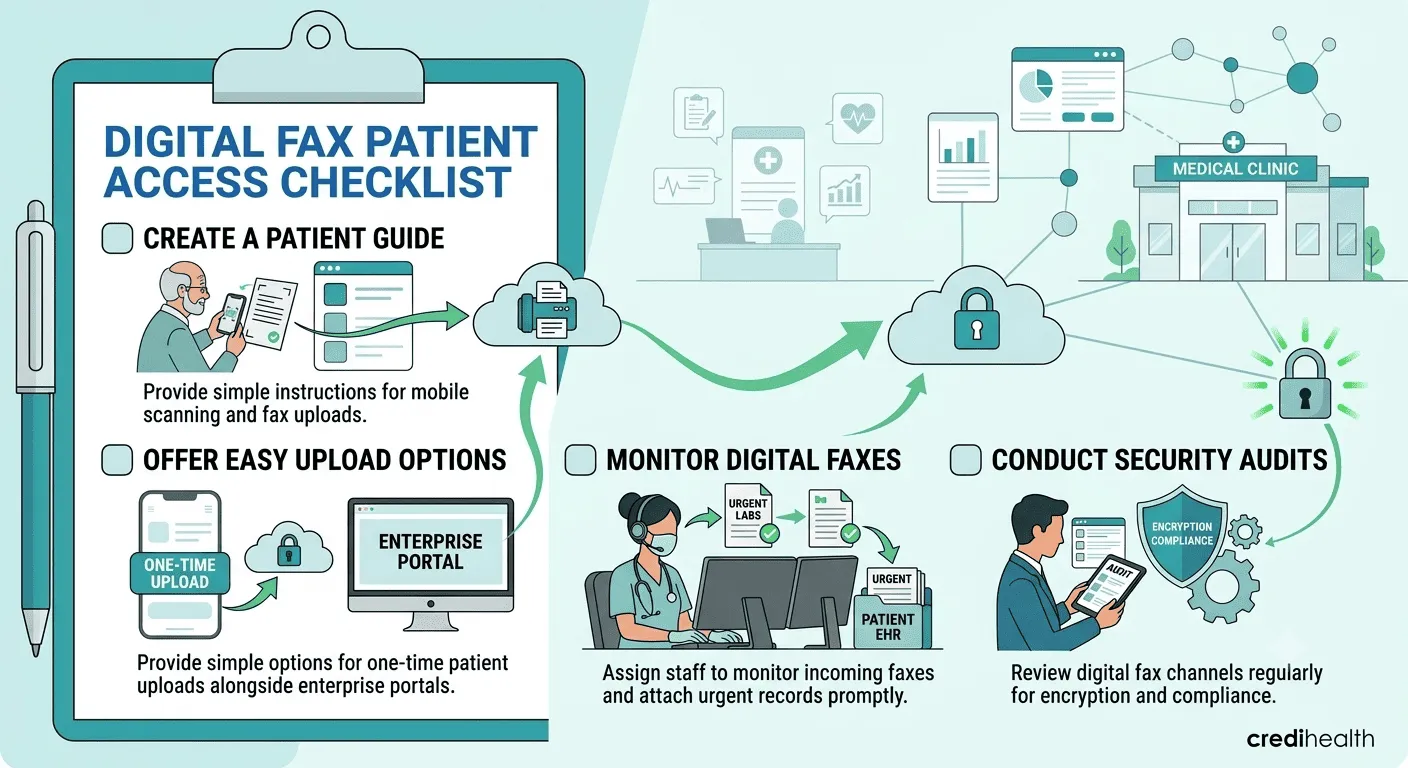
Publish a 1-Page Patient Guide: Create a downloadable instruction sheet or automated SMS template explaining basic mobile scanning steps.
-
Establish Dedicated Transmission Pathways: Provide low-barrier options for one-off patient uploads alongside enterprise portals.
-
Centralize Digital Fax Monitoring: Assign an administrative coordinator to monitor cloud platforms so urgent records are attached to charts immediately.
-
Perform Quarterly Security Audits: Review all digital transmission channels annually to confirm active encryption and regulatory compliance.
Taking Action: How to Modernize Your Remote Intake Today
Transitioning from chaotic document collection to a streamlined digital intake system doesn't require an expensive IT overhaul. Practice managers can start making immediate operational improvements today:
-
Audit Your Current Friction Points: Map out how long it currently takes for a patient's remote submission to reach a doctor's screen. Identify whether delays stem from unreadable photos, missing signatures, or fragmented inbox monitoring.
-
Standardize Patient Communications: Draft a simple, 3-step text or email template that your front-desk staff can send to every remote patient prior to their consultation, specifying preferred document formats and secure submission links.
-
Upgrade Your Intake Security: Replace unencrypted email attachments with secure, HIPAA-compliant cloud channels that automatically centralize incoming records, protect patient privacy, and keep your clinical schedule running on time.
Frequently Asked Questions
Why is sending medical records via standard email considered a security risk?
Standard consumer email protocols pass data through multiple unencrypted servers across the internet. If an email containing Protected Health Information (PHI) is intercepted, the practice faces severe regulatory fines for non-compliance under healthcare privacy laws.
How can non-tech-savvy patients send a paper document digitally without a scanner?
Patients can use the built-in scanning tools on iOS (Apple Notes) or Android (Google Drive) to convert physical paper into clear PDFs. Alternatively, web services like Fax.xyz allow users to upload image files directly from a browser to send a secure fax without requiring account creation.
Can cloud faxing solutions integrate directly with clinical EHR systems?
Yes. Professional cloud platforms like iFax offer EHR/EMR integration via secure APIs, enabling clinical staff to route incoming digital faxes directly into patient charts without printing or manual scanning.
What should a medical coordinator do if a received record is blurry or incomplete?
Coordinators should immediately flag the record, contact the patient via SMS or phone, and provide direct steps to re-capture the document using a mobile scanner app rather than a standard photo camera.

Reviewed by